The mdbook-typst preprocessor
This preprocessor allows you to include typst in your mdbook.
Currently, two forms are supported: code blocks and autolinks.
Packages are supported, but slightly differently than how the typst CLI does. See Package support for more
information.
The aim is to compile all typst code (inline and files) is compiled as if you’d run
typst compile path/to/file.typ --pages 1 --output svg
from the book’s source directory, and injecting the resulting SVG into the document inline or with a markdown image link.
Code blocks
The contents of code blocks whose information line is equal to typst are interpreted as typst code and transformed
into an SVG, and the first page of the output is placed at the location of the code block.
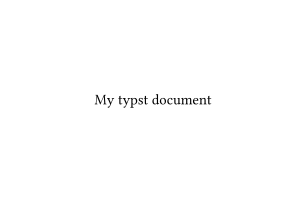
For instance, the following code block:
```typst
#set page(width: auto, height: auto)

My typst document
```
renders like this:
File inclusion
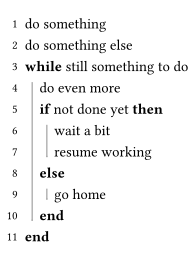
Typst files can also be included directly by creating autolinks with the typst:// scheme.
For instance, including the file included.typ by writing <typst://included.typ> displays as follows:
and <typst://nested/nested.typ> displays like this:
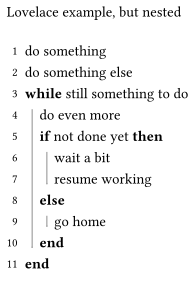
The contents of the included typst file can be seen in this sub-section
Package support
Packages, as included through the #import "@preview/name:version" directive in your typst code, are supported. However,
the preprocessor will not download packages for you automatically by default. To download packages, there are two alternatives
as described below.
Automatically installing packages
If you have wget and gunzip installed and available in your PATH, you can set the preprocessor.typst.auto-download configuration
to true. If set, the preprocessor will automatically fetch non-downloaded packages from the typst universe during the build process.
If you don’t have wget and gunzip available, or want to download your packages from a different source, set the preprocessor.typst.auto-download
configuration to a string describing the program to execute to perform the download. For each non-downloaded package, that command will be executed,
with the following arguments:
- The destination file path of the to-be-downloaded tar file
- The package spec for the package to download (e.g.
@preview/name:version) - A list of allowed licenses
If preprocessor.typst.auto-download is set to my-custom-command.sh, an example of such a call would look like this (line breaks added for illustration):
my-custom-command.sh \
    '/path/to/book/typst-pkgs/lilaq-0.6.0.tar' \
    '@preview/lilaq:0.6.0' \
    'MIT' \
    'MIT OR Apache-2.0'
Manually installing packages
To install packages manually, you’ll have to download the tar.gz files, decompress them, and place them in the typst-pkgs subdirectory of your book
root.
If you have and wget and gunzip installed, the preprocessor can do this for you: simply call mdbook-typst download <package-version> <target-dir>.
If you do not have these tools available (or would prefer not to have the mdbook-typst preprocessor execute the command for you), an example of
doing all of this manually using the lilaq:0.6.0 package in an mdBook in the book/ directory can be seen below:
# Download the .tar.gz file
wget https://packages.typst.org/preview/lilaq-0.6.0.tar.gz

# Decompress it
gunzip lilaq-0.6.0.tar.gz

# Create the `typst-pkgs` directory if it didn't exist yet
mkdir book/typst-pkgs/

# Move the now-decompressed tarball to the correct directory
mv lilaq-0.6.0.tar book/typst-pkgs/
License validation
When using the built-in downloader (either through the CLI or auto-download = true), the downloader automatically validates
that downloaded packages have a license that is configured to be allowed. By default, this configuration is set to
["MIT", "MIT OR Apache-2.0"].
To allow additional values for the license field of downloaded packages, set the preprocessor.typst.allowed-licenses configuration
key to your list of allowed licenses.
Using markdown image links instead of inline svg data
By default, the preprocessor replaces your typst with inline SVG data in the output markdown. However, it also supports using image links instead of inline-data if you wish.
To enable this behaviour, you must set the preprocessor.typst.svg-dir value in your book.toml to the path
to a subdirectory in your book source. Additionally, you must add that directory to the .gitignore in your
book’s root to prevent mdbook serve from rebuilding the project infinitely.
For example
# book.toml
[preprocessor.typst]
svg-dir = "_typst_generated"
# .gitignore
book
src/_typst_generated/
Typst files in nested markdown files
Nested files are also supported. Relative links are resolved from the path of the current markdown file, and absolute paths are resolved from the book’s source.
Some examples:
<typst://nested.typ> renders src/nested/nested.typ
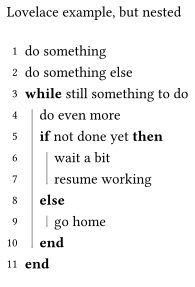
<typst:///included.typ> renders src/included.typ
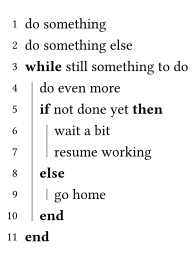
and <typst://../included.typ> also renders src/included.typ
The included typst file
#set page(margin: 5pt, width: auto, height: auto)
#import "@preview/lovelace:0.3.0": *

#pseudocode-list[
  + do something
  + do something else
  + *while* still something to do
    + do even more
    + *if* not done yet *then*
      + wait a bit
      + resume working
    + *else*
      + go home
    + *end*
  + *end*
]